Loan Creation Process Guide
This guide provides a step-by-step walkthrough for creating and applying for a loan within the system. It includes everything from customer selection to interest calculation and accounting setup.
Prerequisites
A Customer ID is required to apply for a loan.
Prerequisites
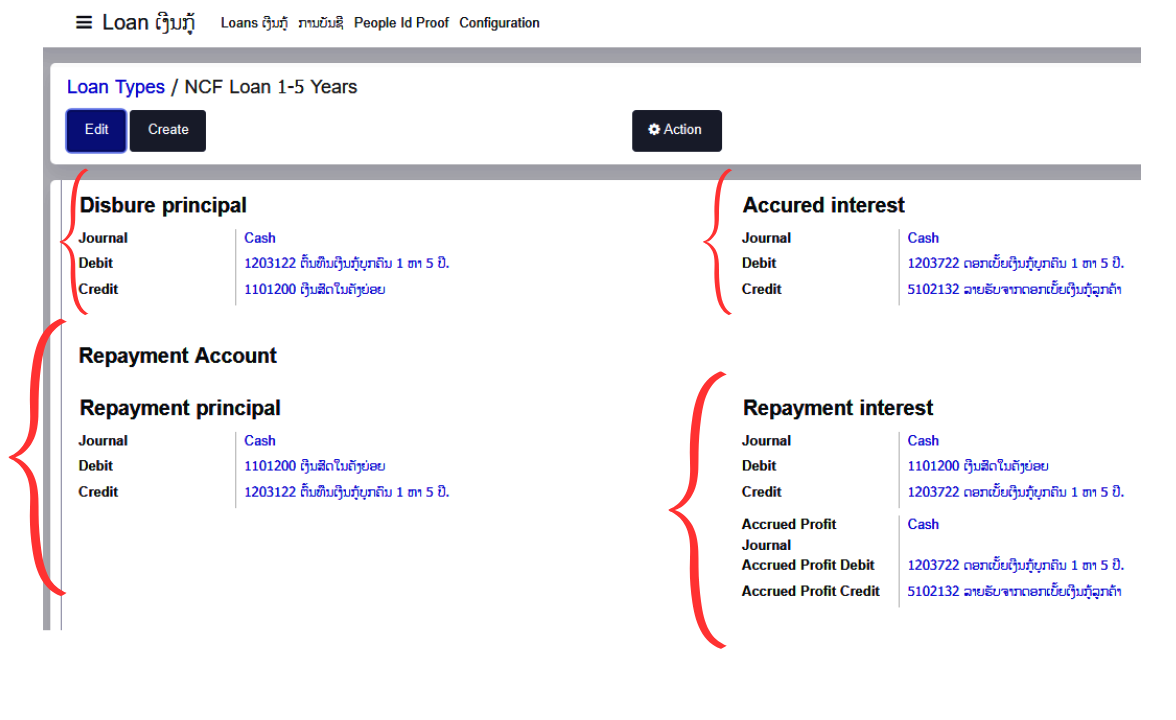
Before creating any loan, make sure all the Ledgers are mapped for Each Loan type(Products).
Step-by-Step Loan Application Process
If the customer does not exist, you can create one during the application process using the Quick Create feature or via the Customer Guide.
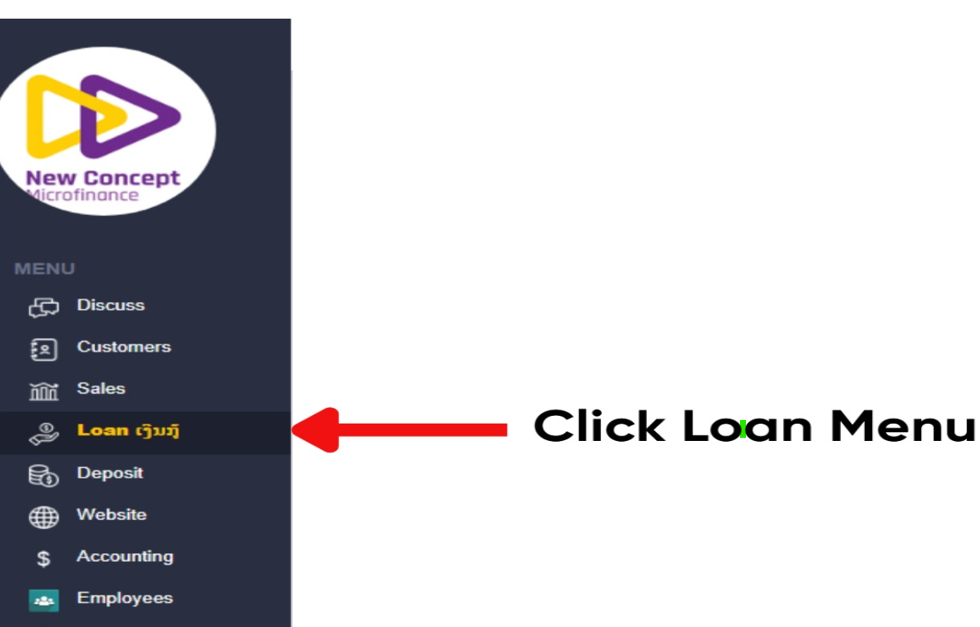
Access the Loan Module
- Navigate to the Loan Menu.
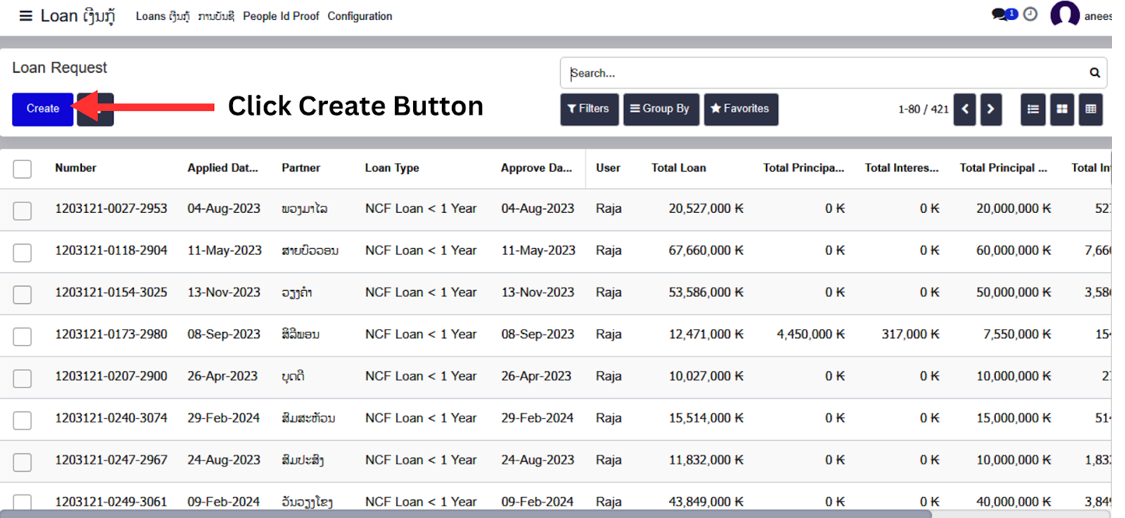
- Click the Create button to start a new loan application manually.
Loan Information
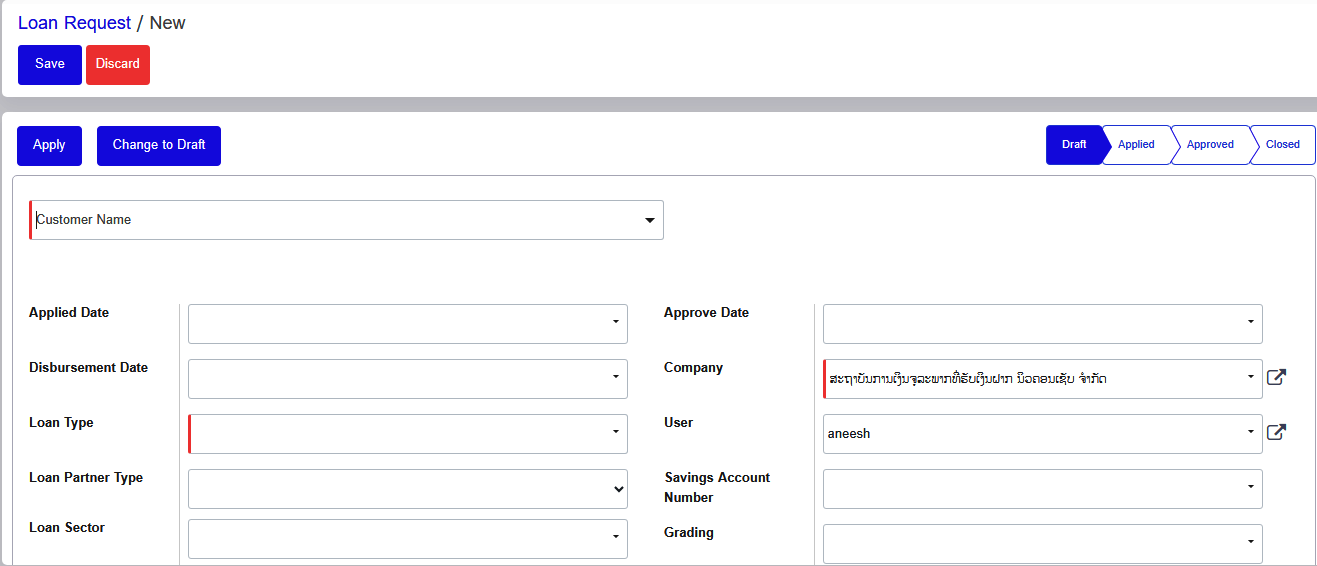
Customer Identification
- Enter the existing customer name in the search field.
- If the customer hasn't been created yet, select “Create and Edit” or type “New Customer” to launch the quick creation form.
Loan Dates
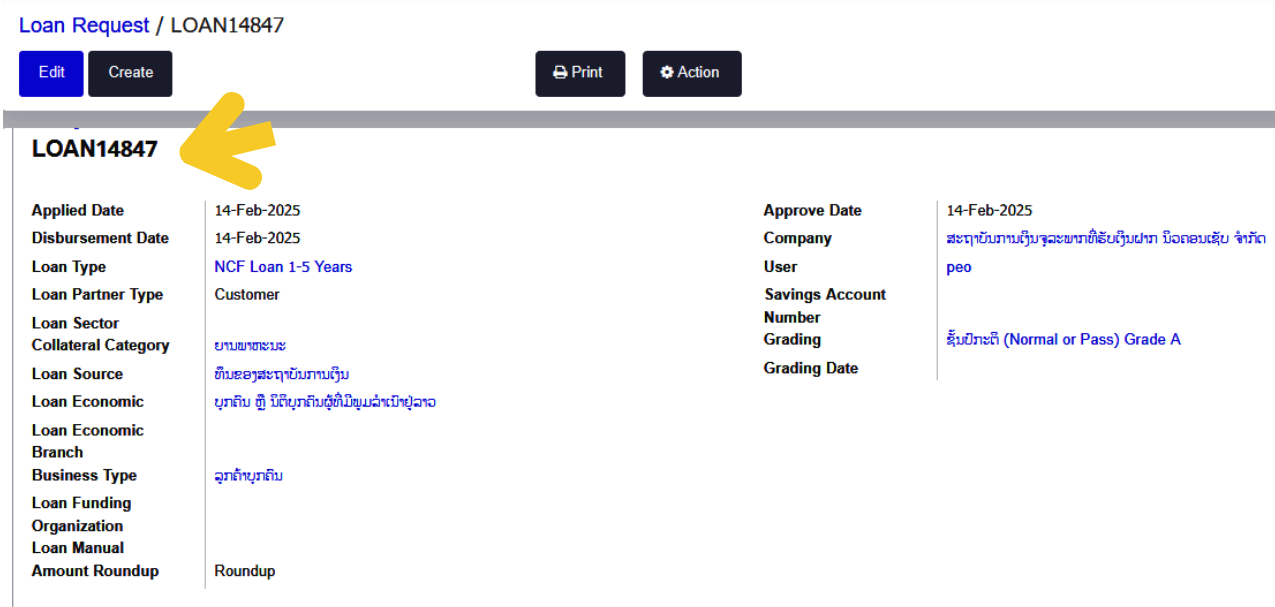
- Applied Date: The date the loan application is initiated.
- Approval Date: The date the loan is reviewed and approved.
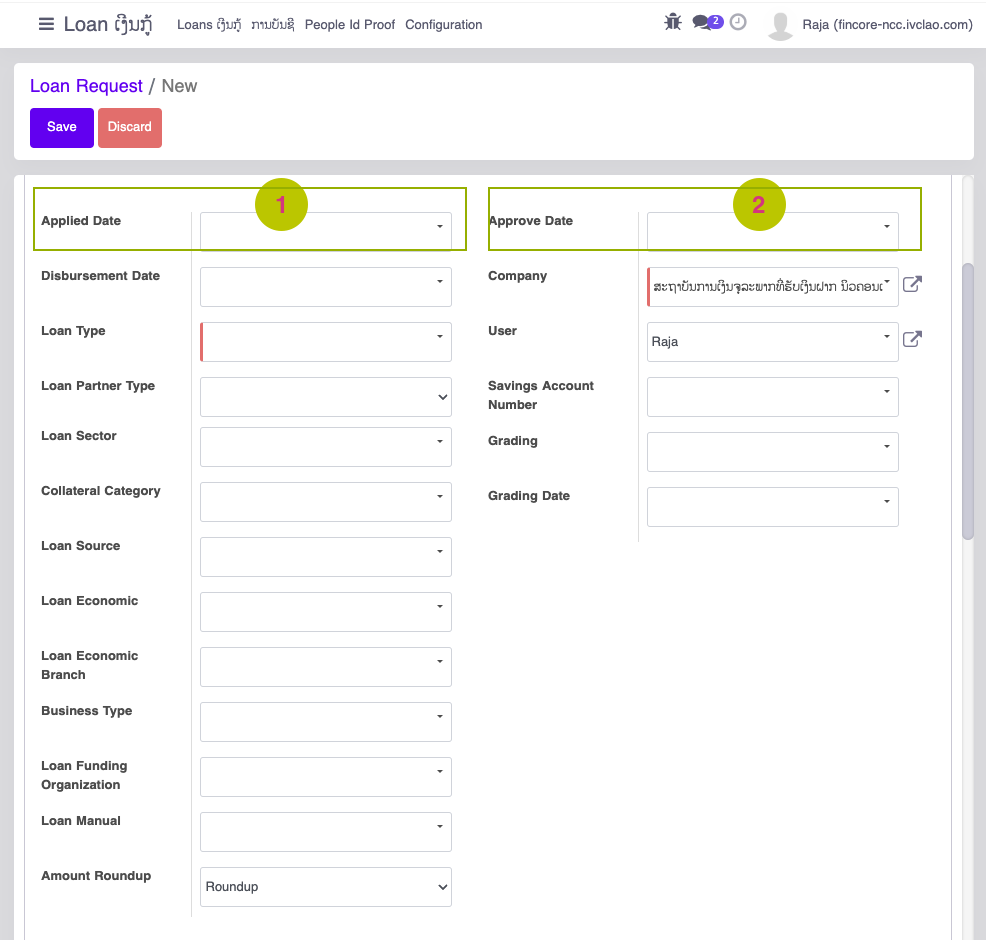
Loan Classification
- Loan Type: Select your loan type from the dropdown menu
- Loan Partner Type: Choose "Customer" or "Enterprise" as appropriate
- Loan Sector: Select your loan sector, Use "Search More..." or "Start typing..." if your option isn't visible
- Collateral Category: Select appropriate collateral type, Use "Search More..." or "Start typing..." if your option isn't visible
Additional Loan Information
- Loan Source: Select from the dropdown menu, Use "Start typing..." to find specific options
- Loan Economic: Select from the dropdown menu, Use "Search More..." if your option isn't visible
- Loan Economic Branch: Select appropriate branch, Use "Search More..." or "Start typing..." if your option isn't visible
- Business Type: Select from the dropdown menu, Use "Start typing..." to find specific options
Funding and Administrative Settings
- Loan Funding Organization: Select your funding organization, Use "Other Option" or "Start typing..." if needed
- Loan Manual: Select from the dropdown menu, Use "Start typing..." to find specific options
- Amount Roundup: Select your preferred option for rounding loan amounts
Loan Calculation details
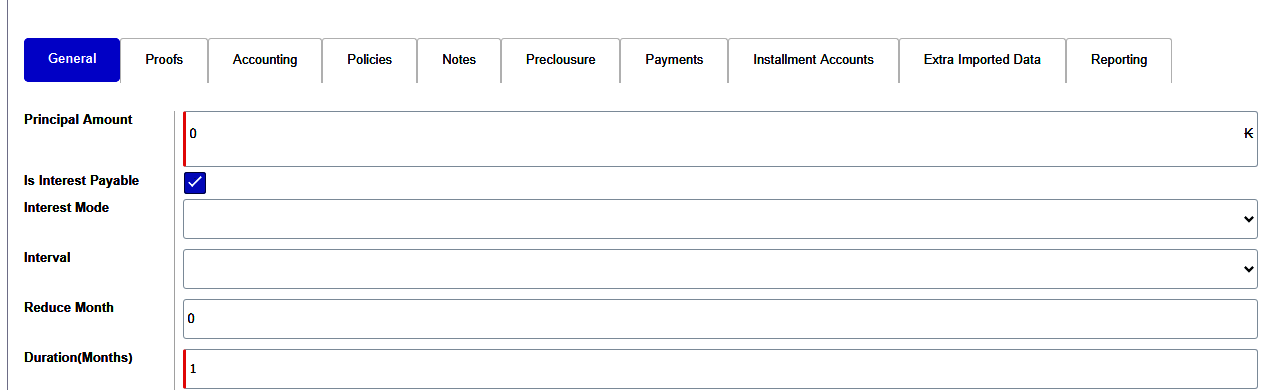
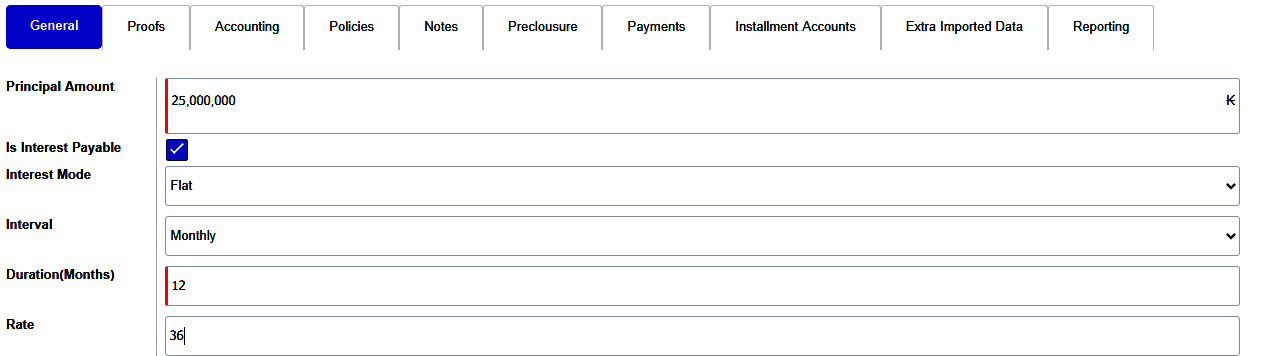
- Principle Amount: Loan Amount that customer requested for / Eligible for
- Interest Mode:
There are 4 different Interest calculation modes are there:
- Flat: Interest is calculated on the full original loan amount throughout the entire loan term, regardless of repayments made.
- Reducing: Interest is calculated only on the remaining outstanding principal balance, which decreases with each payment made.
- Fixed EMI: Equal monthly installments combining principal and interest payments, with early payments reducing the loan term without changing EMI amount.
- Bullet: Interest-only payments during the loan term with the entire principal amount due in a single payment at maturity.
- Reduce interval: It will be applied only for Reducing Interest Mode. Instead of interest decreasing every month, It can be modified to reduce only on certain intervals.
- For Example: Reduce the interest for every 3 months once.
- Duration(Months): Duration of the Loan Contract
- Loan Terms: Loan Terms are similar to Duration. Since some loan contracts can be calculated by week or Daily. In order to mention the exact duration we are using this field.
- For Example: IF a loan contract is 8 weeks. It suppose to be
- Duration= 2
- Months Loan Terms= 8
- Rate: Interest Rate for the Loan
Loan Processing...
When a customer applies for a loan, the system captures all required personal and financial information. Upon submission, a unique loan number is automatically generated by the system.
Loan Setup Details
Loan Processing Workflow
- Principal Amount: The initial amount loaned to the customer, used as the basis for interest calculations.
- Interest Mode – Flat Rate: Interest is calculated on the entire principal amount for the full loan term, regardless of how much has been repaid. The interest amount remains constant throughout the loan period.
- Interest Calculation Interval: Monthly
- Loan Duration: 12 months (1 year)
- Interest Rate: The fixed annual percentage rate (e.g., 10%) applied to the principal.
Loan Application Flow
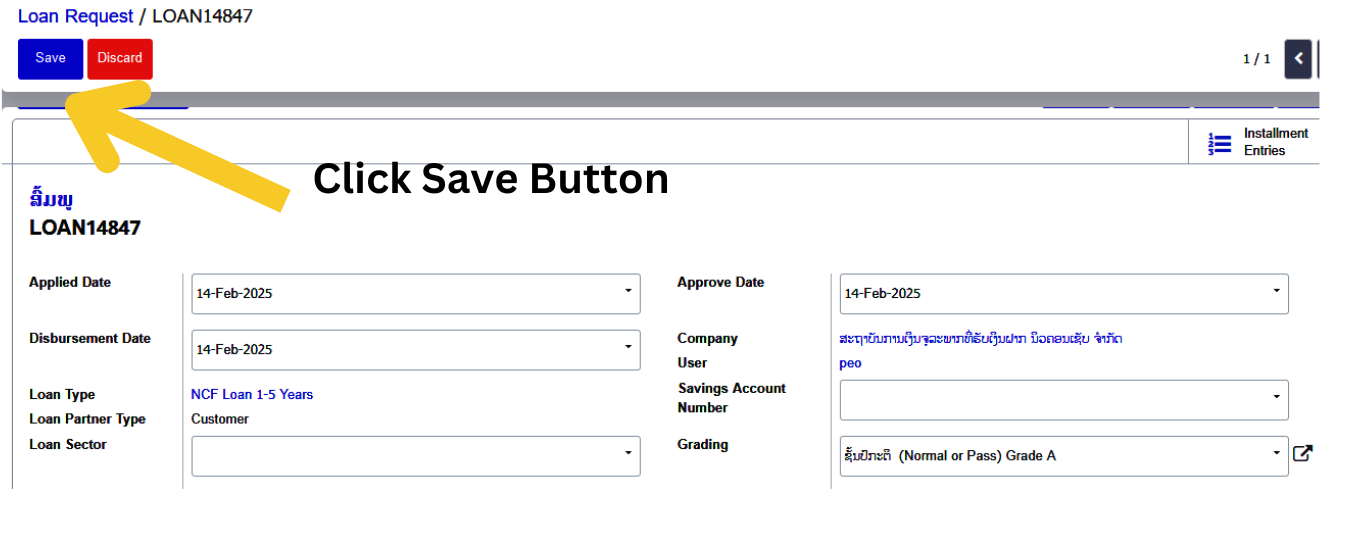
- Save Loan: The user can save the loan application with all entered details, which can later be reviewed or modified.
- Modify Loan: Users can edit key fields such as amount, duration, or interest rate before submission.
- Apply for Loan: After saving, the loan can be submitted for approval.
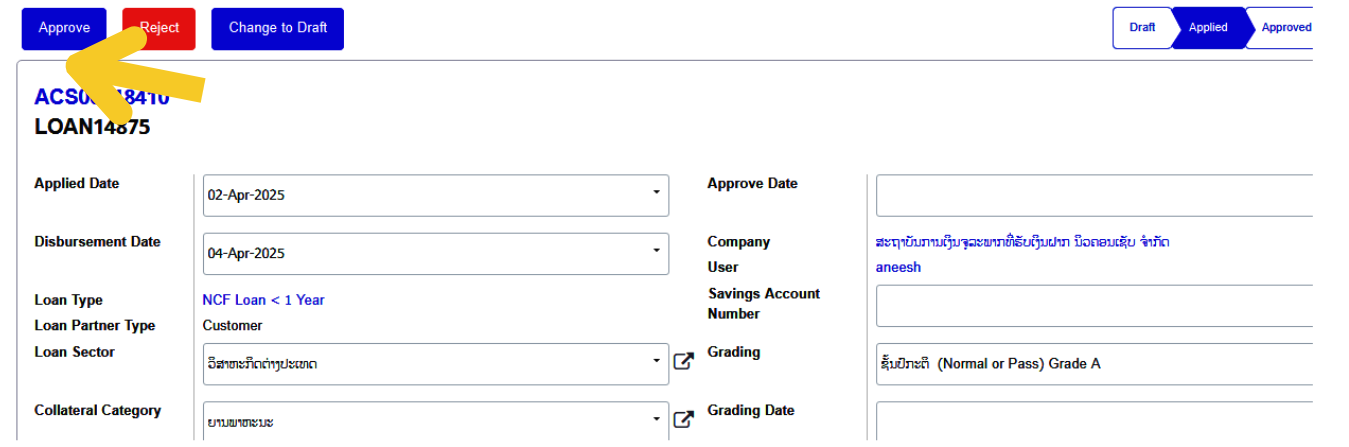
- Manager Approval: When the manager clicks the "Approve" button, the system updates the loan status to Approved.
- Apply Loan Option: After saving the loan, the user may have the option to apply for the loan, either confirming or submitting it for approval.
- Modify Loan Details: The user can modify the loan details (like amount, interest rate, or duration) before submitting or after saving it.
- Manager Clicks the “Approve” Button
- If the manager decides to approve the loan, they would click the "Approve" button in the system. This triggers the following:
- System updates the loan status to "Approved".
EMI Chart
EMI Chart Generation
Once the loan is approved, the system generates a Monthly EMI Chart that provides a detailed breakdown of the customer's repayment schedule over the loan tenure.
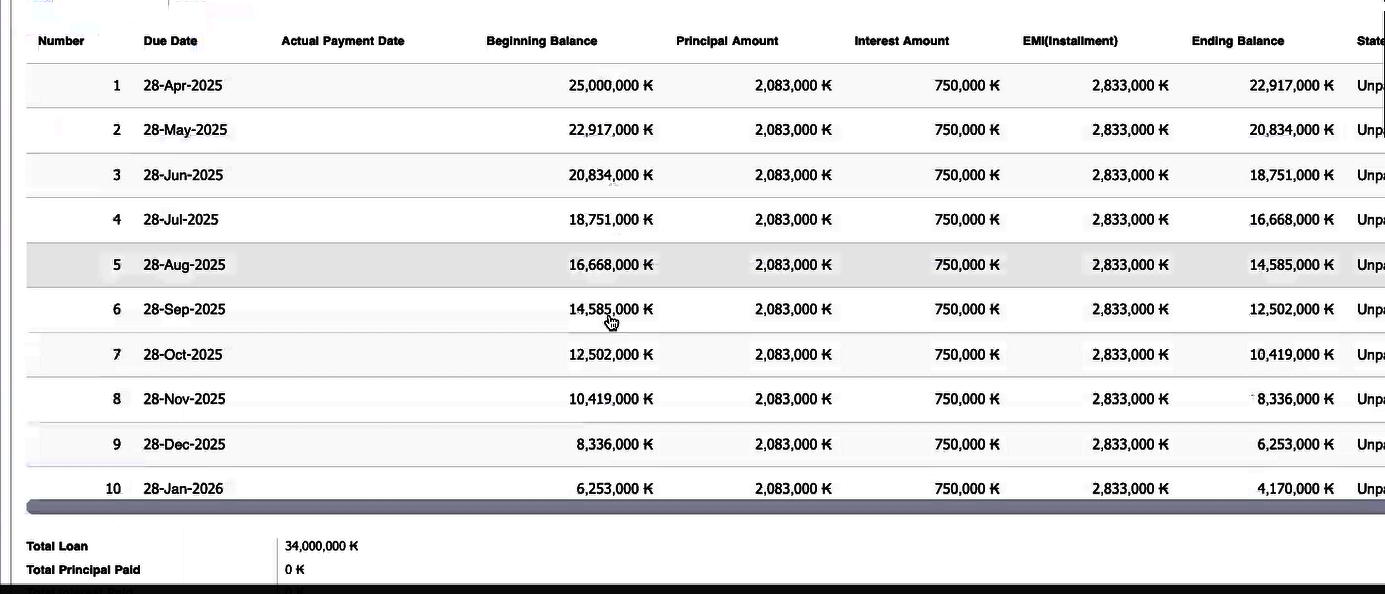
EMI Chart Includes
- EMI Amount: Fixed monthly payment
- Principal Component: The portion of EMI that reduces the principal
- Interest Component: The portion of EMI covering interest
- Remaining Balance: Outstanding loan balance after each installment
EMI Types
Fixed EMI
- Definition: A constant EMI amount is paid throughout the loan term.
- How it Works: The total interest and principal are divided evenly over the loan duration.
- Best For: Home loans, personal loans, car loans.
Weekly EMI
- Definition: Payments are made on a weekly basis.
- How it Works: Smaller payments are made weekly instead of monthly, which helps manage cash flow.
- Best For: Microloans, short-term loans, flexible repayment loans.
Monthly EMI
- Definition: Standard repayment structure with monthly payments.
- How it Works: Equal monthly installments cover both interest and principal.
- Best For: Most standard loans (home, auto, personal, student loans).
Daily EMI
- Definition: Daily repayment structure.
- How it Works: Small daily payments, ideal for borrowers with daily income.
- Best For: Small loans, payday loans.
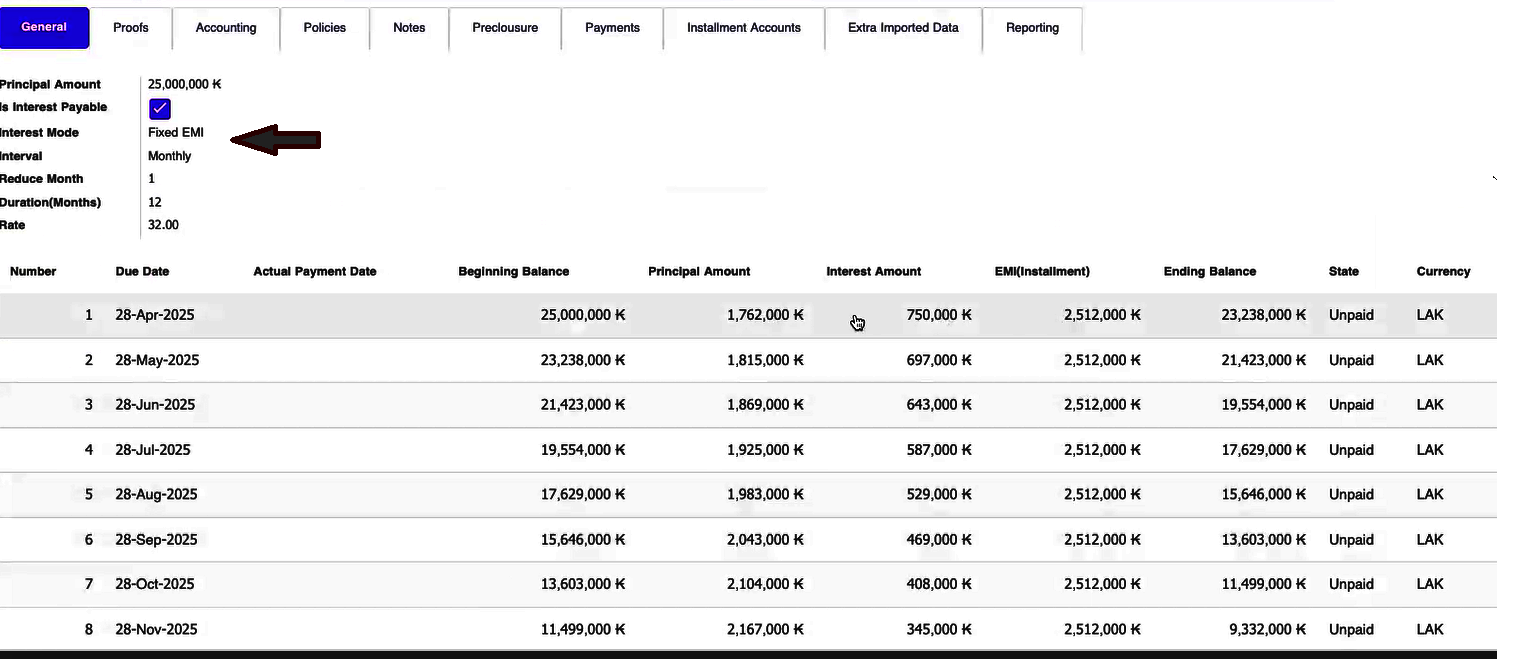
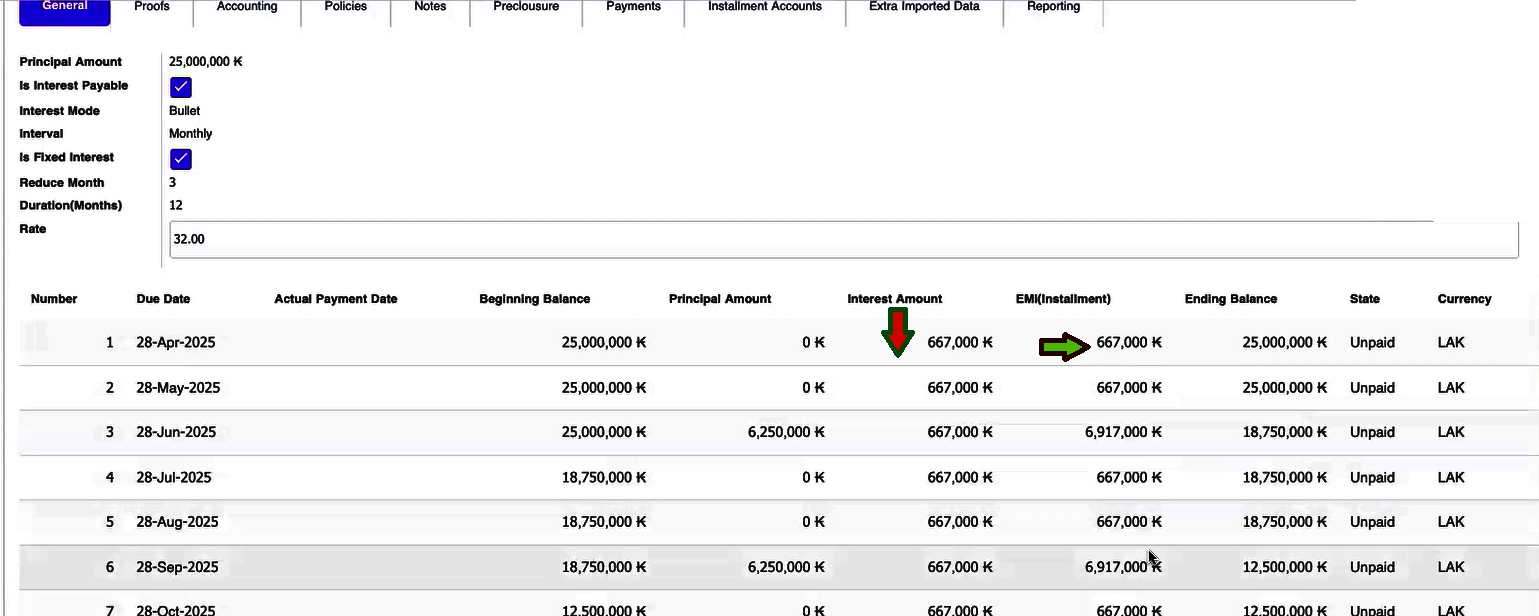
Interest Mode
Flat
- Interest remains fixed each month.
- Principal repayment varies monthly.
Reducing
- Interest decreases every month as the outstanding principal reduces.
- The interest mode is decreasing month by month so if it is reducing interest mode then the monthly interest is decreasing.
Fixed EMI
- You can change the month interval i.e. increase from one month to another month.
- Fixed EMI offers some interest rate concessions to customers, and these concessions vary depending on each loan type.
Bullet
- Monthly EMIs are the most common form where repayments are made once every month.
- The loan is divided into equal monthly installments which include both the interest and the principal amount.
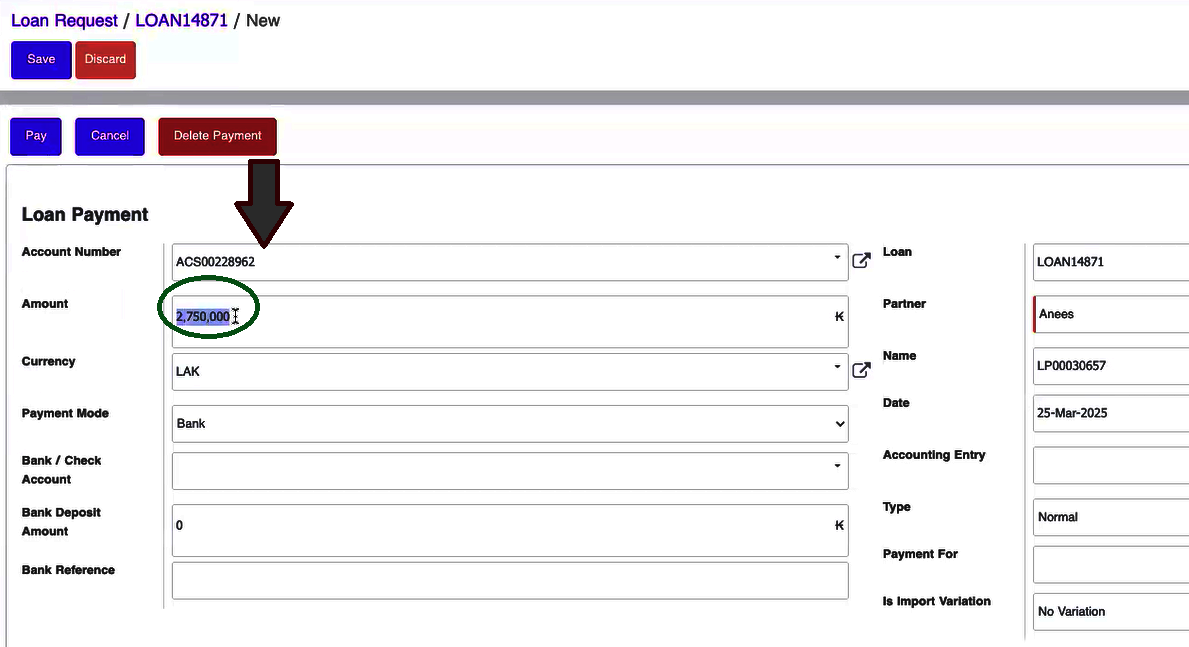
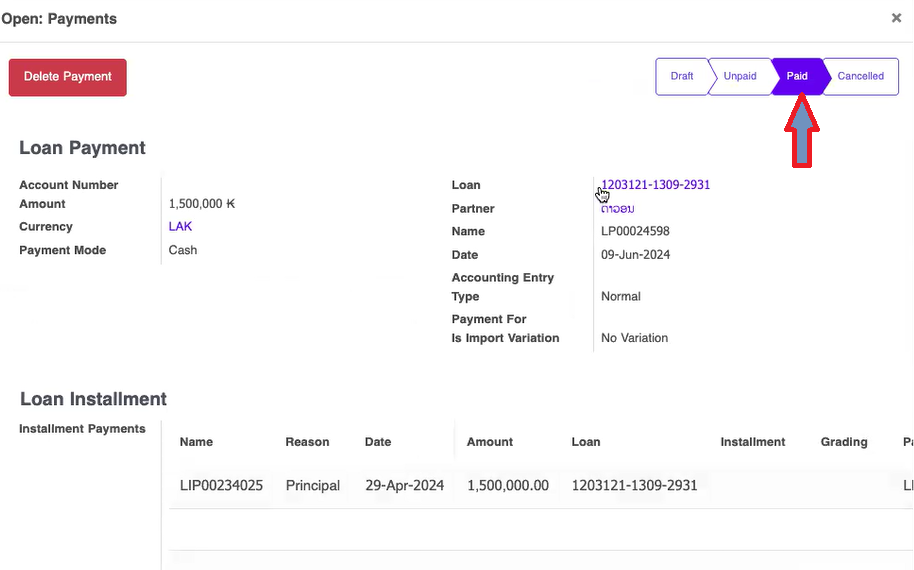
Loan payment
- If you want to make a payment for the loan, you need to enter the Savings Support Number.
- The Savings number that you have saved will be displayed directly on the screen.
- The loan amount will also be displayed. The account number will already be mapped.
- "If you can afford this amount, it's an acceptable option for your loan."
- "You may proceed with this amount if it fits your financial situation.
Payment Methods
Customers can repay their loans using one of the following accepted payment methods:
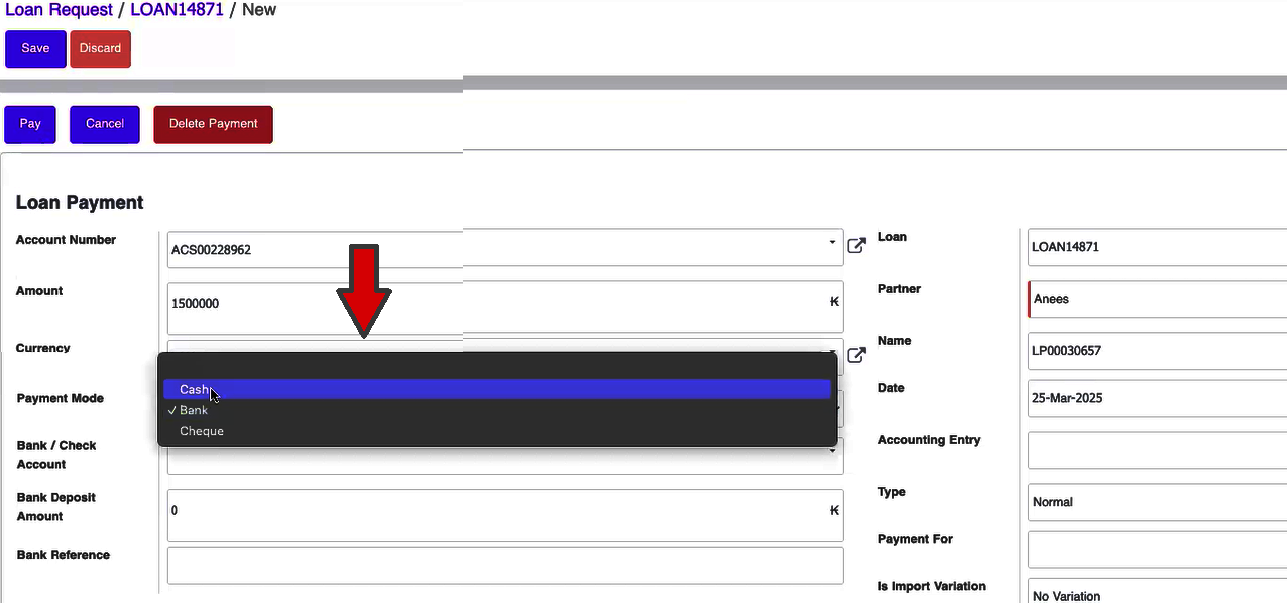
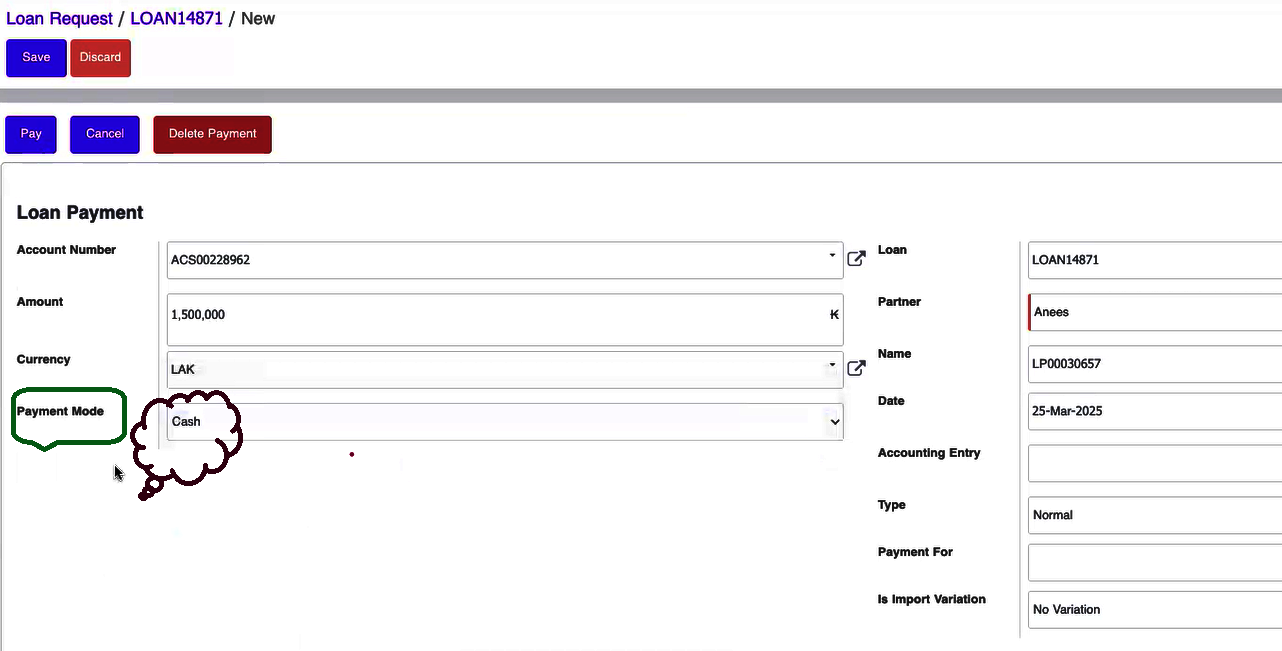
Cash Payment
- When paying in cash, the system will display only fields relevant to cash transactions.
- You must enter the total amount received.
- The payment will be applied directly to the loan balance and recorded accordingly.
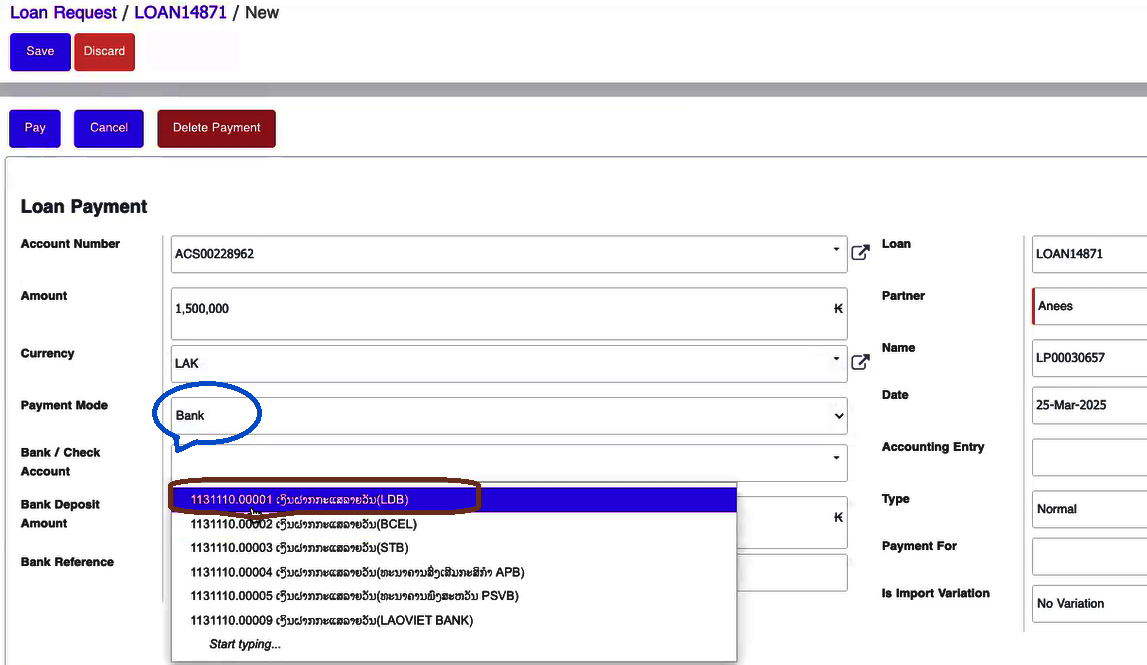
Bank Payment
- For bank transfers, the payment is recorded in the system’s bank ledger under the appropriate ledger ID.
- Once received, the amount is credited to the loan account, ensuring accurate financial tracking and auditability.
Cheque Payment
- Although many institutions now favor online or automated payment methods, cheque payments may still be accepted.
- If permitted: The cheque details (e.g., cheque number, issuing bank) must be entered into the system.
- The payment is processed similarly to a bank transfer but may involve additional verification steps depending on institutional policy.
Loan Disbursement
After a loan is approved, the disbursement process ensures that funds are properly allocated and made accessible to the customer.
Disbursement Process
Once the loan is approved, the disbursement is initiated automatically by the system.
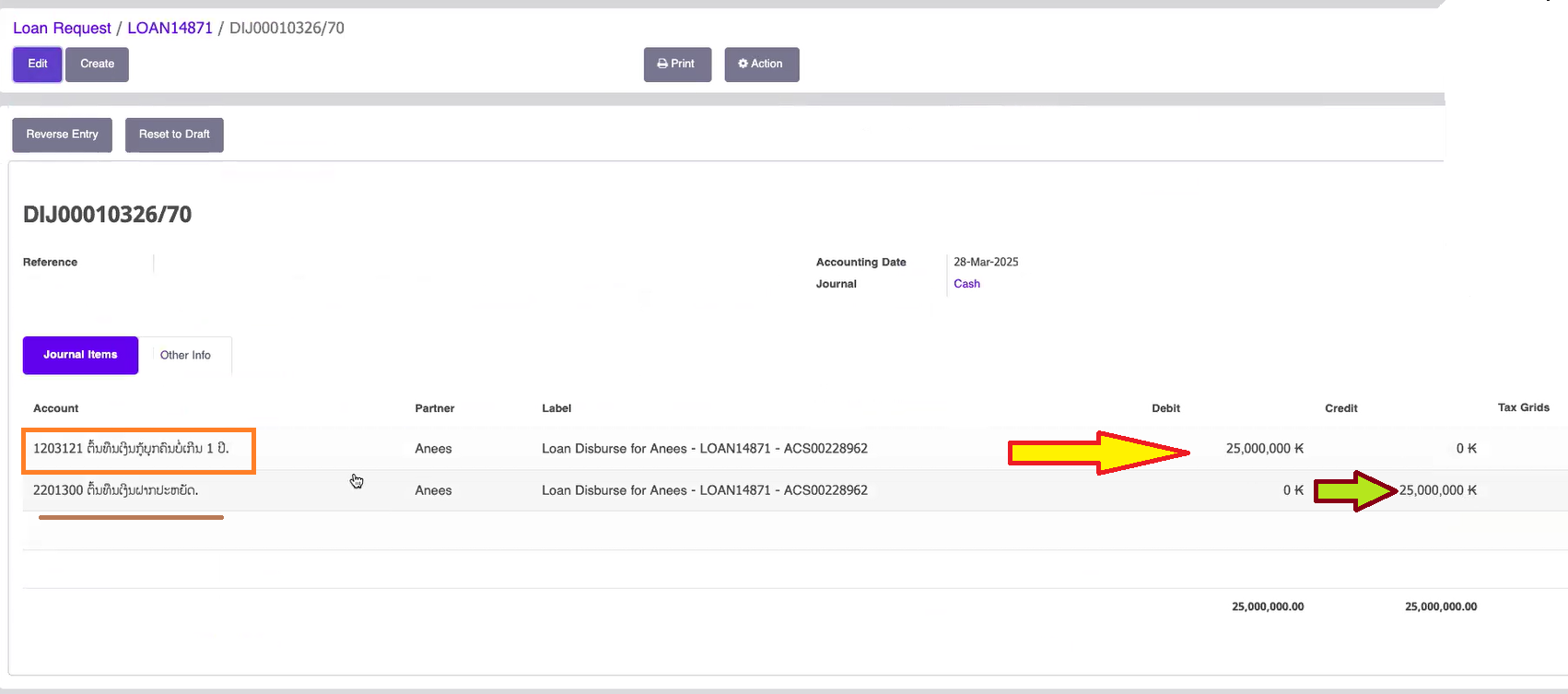
The principal amount is debited from the loan account and credited to the customer’s savings account.
This transfer makes the loan funds readily available for the customer to use as intended.
Transaction Tracking
To review disbursement details, navigate to the Accounting section in the system.
- The accounting records provide a comprehensive view of the transaction, including all debit and credit entries, ensuring full transparency and auditability.
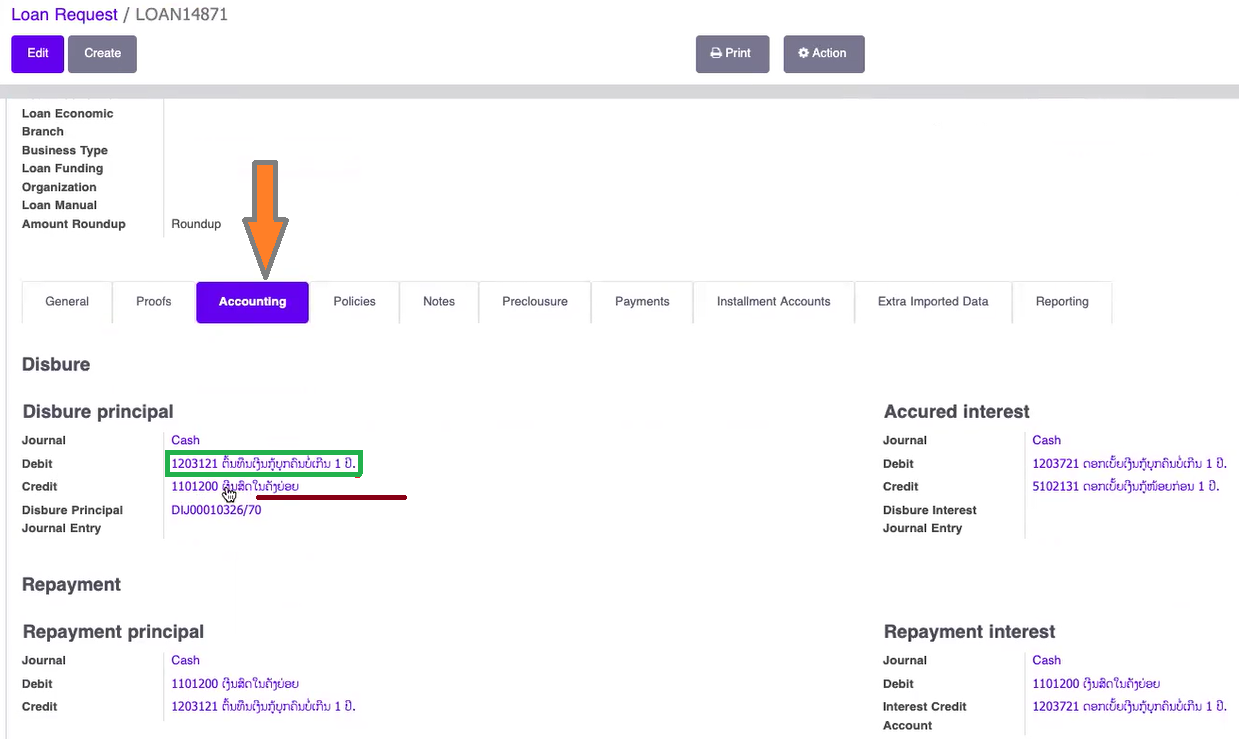
If you click on the loan, you will see where the debit is and where the credit is. You can find out.
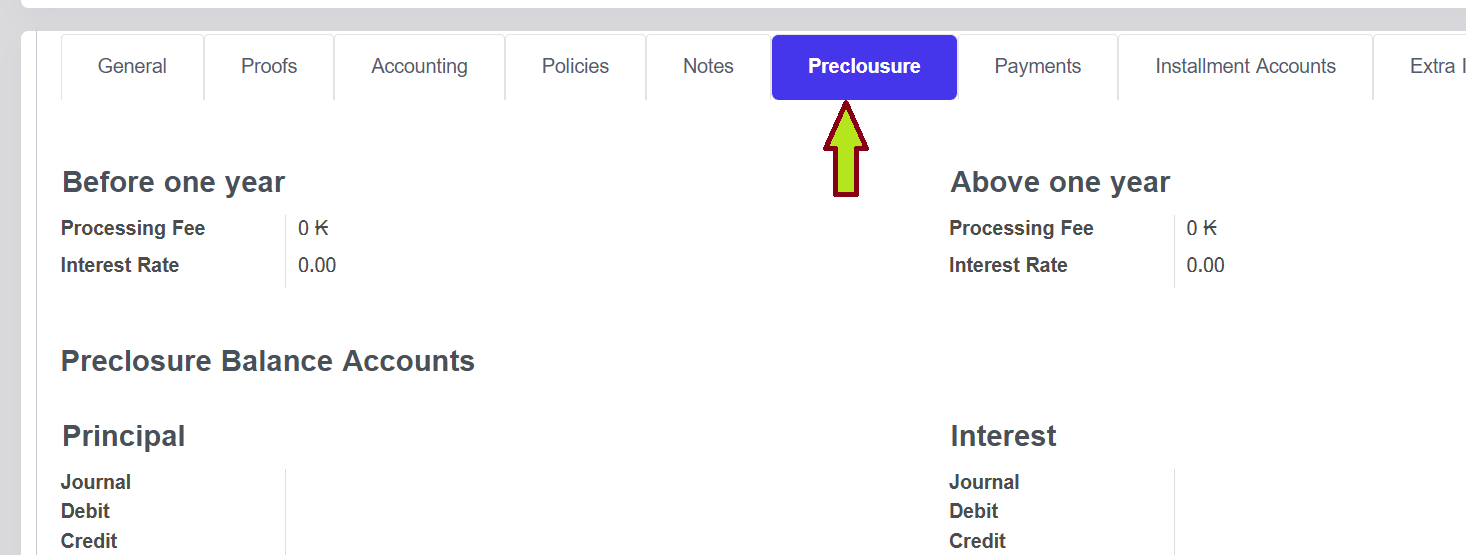
Loan Preclosure
- Preclosure is simply the act of paying off a loan before its scheduled end date. It could mean paying off the entire loan or just making extra payments toward the principal balance early.
- By doing this, you can potentially save money on interest, since most loans accrue interest on the remaining balance.
- If you decide to repay the loan in 12 months instead of 30, your monthly payment will increase significantly. Since you're compressing the repayment period from 30 months to 12 months, the loan balance will need to be cleared in less time, which means the amount paid each month will be higher.
Additional Communication Tools
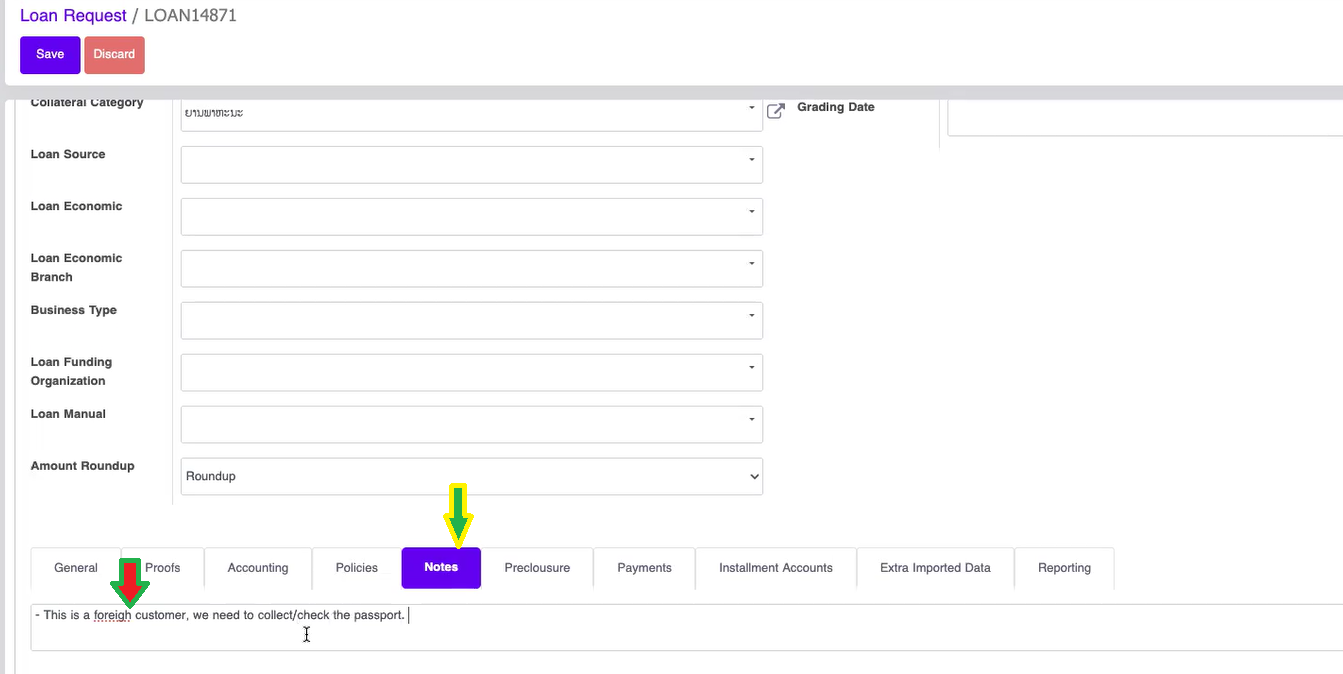
Notes
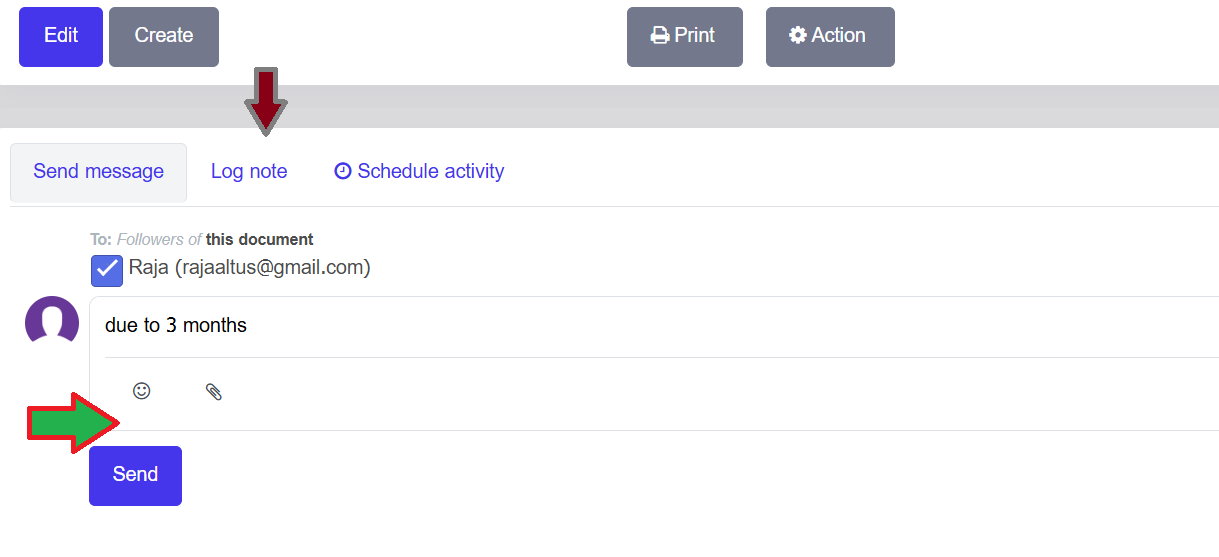
- The Notes feature allows the loan creator to add internal comments or instructions.
- These notes can be used to communicate important information to the loan approver, such as verification requests or approval guidance.
- Notes are saved within the loan record and are visible to the loan manager during the approval process.
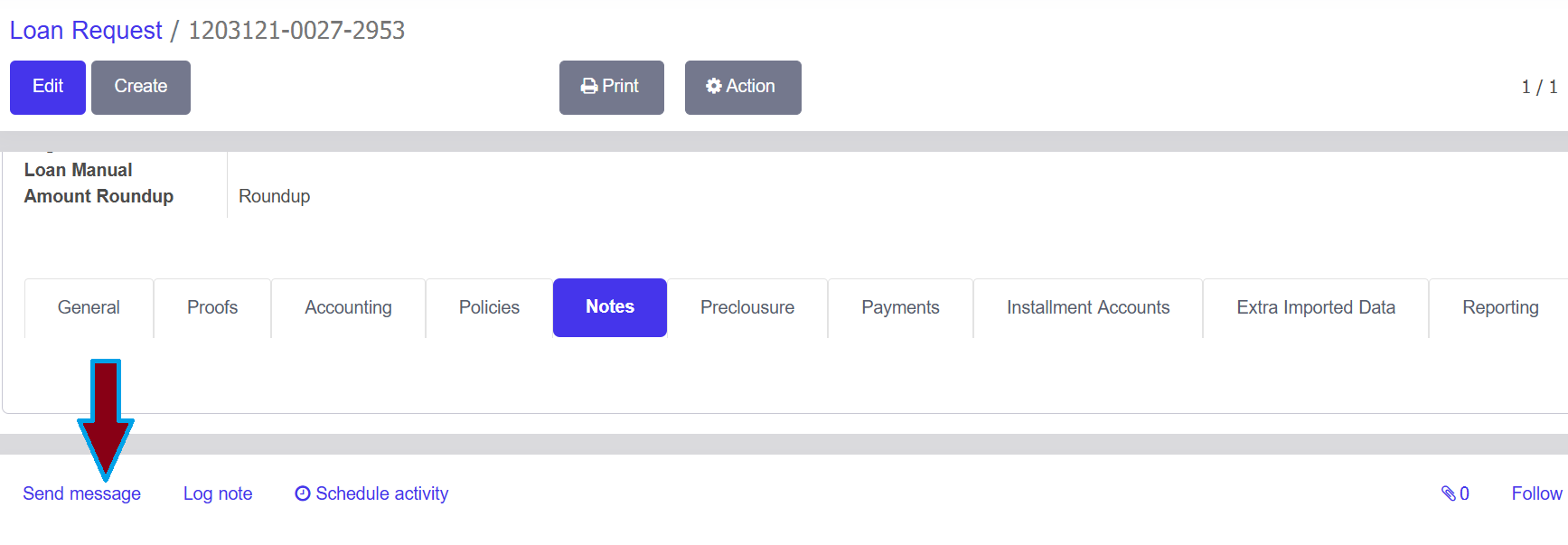
Send Message
- The system includes an integrated messaging tool for communication within each loan record.
- Messages can be sent to specific team members or loan followers, helping streamline collaboration.
- This feature is especially useful for discussing customer interactions or coordinating actions between departments.
Log Notes
- Log Notes provide a space to document key events, updates, or conversations related to the loan.
- These notes can be exported, printed, or sent as text messages, ensuring important details are preserved and shared when needed.
LOAN WRITE-OFF
1. Overview
What is Loan Write-Off?
Loan Write-Off is the process of removing uncollectable loans from the active balance sheet. This feature ensures full compliance with Bank of Laos (BOL) regulatory standards while maintaining complete audit trails.
Key Features
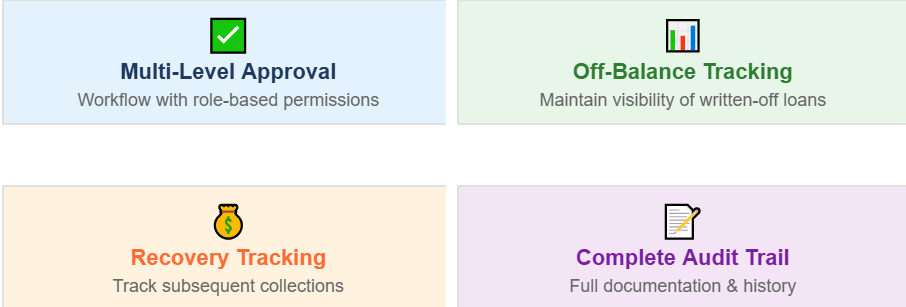
When to Use Write-Off


2. Configuration Settings
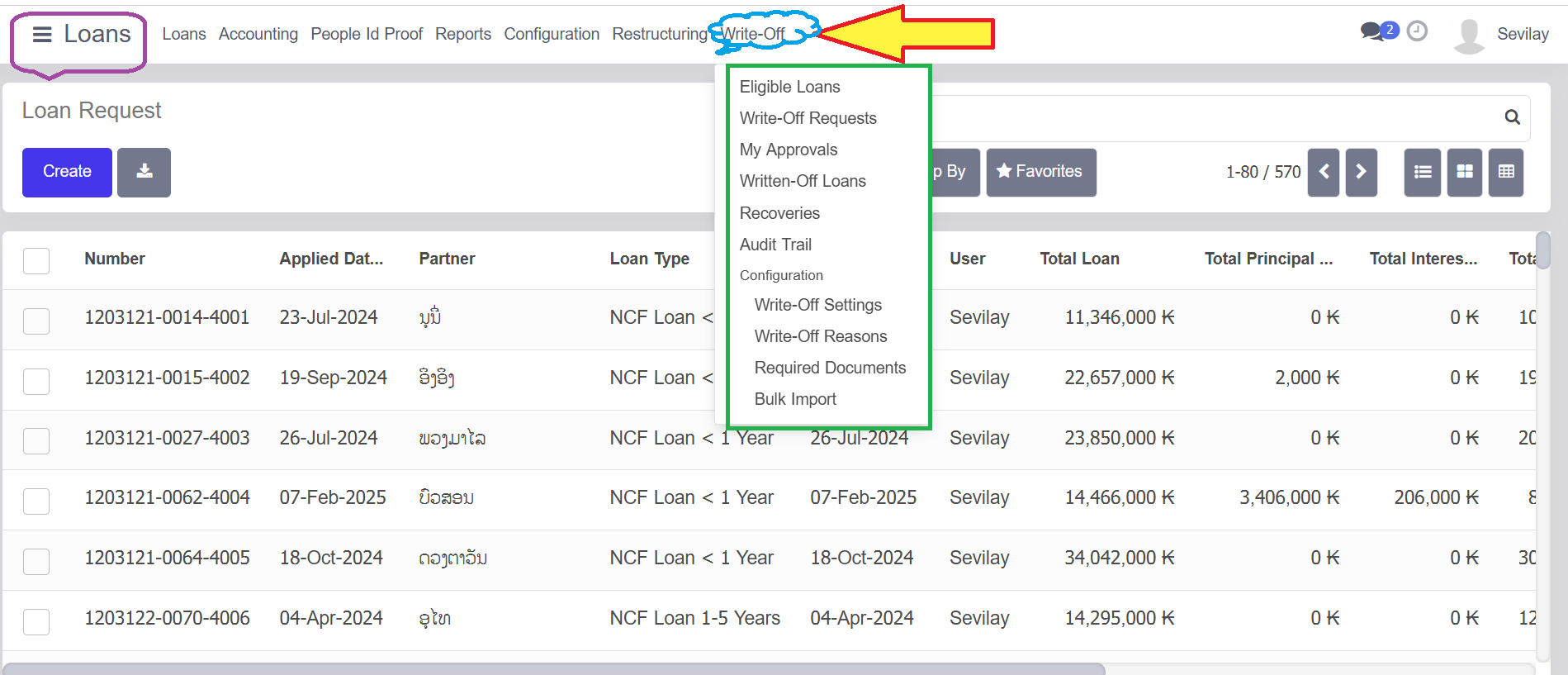
Navigation Path
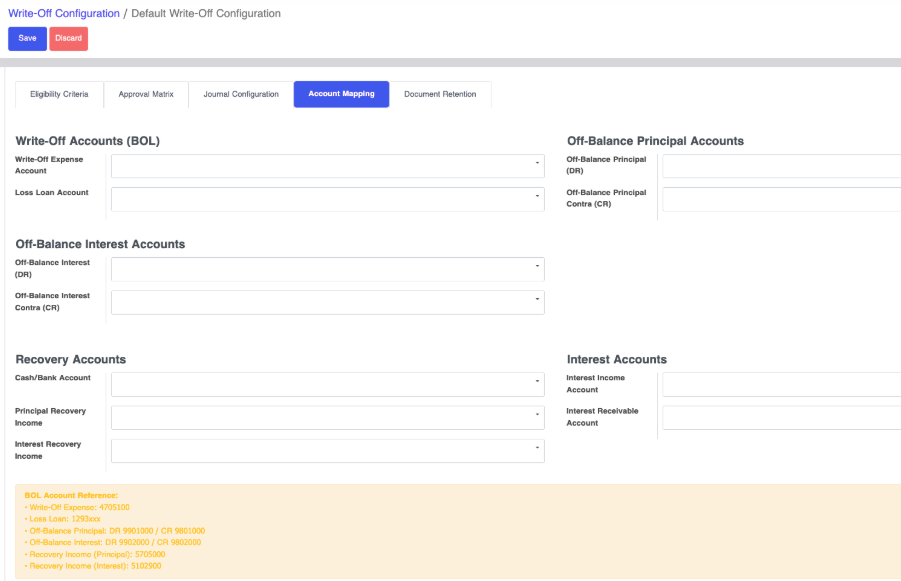
Loans → Configuration → Write-Off Configuration
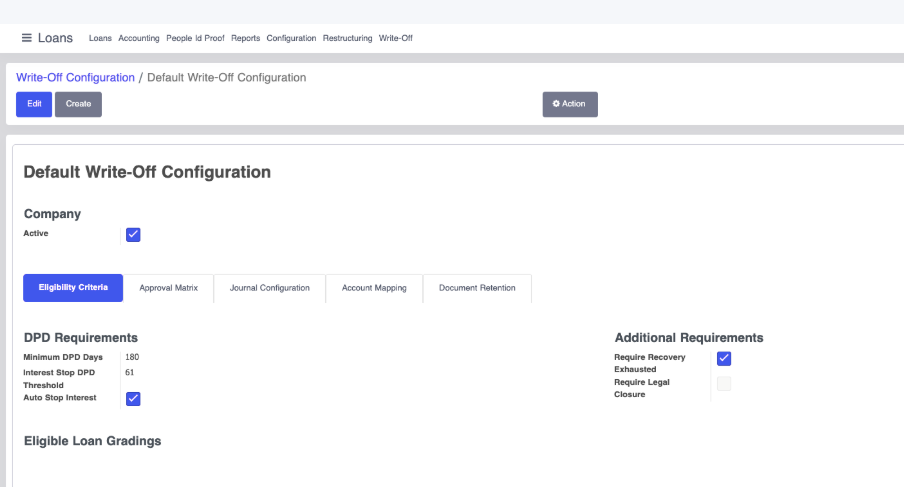
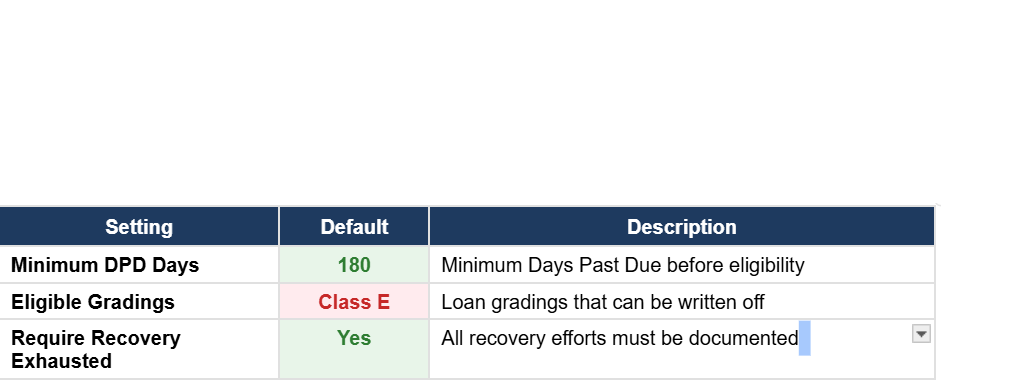
Eligibility Criteria Settings
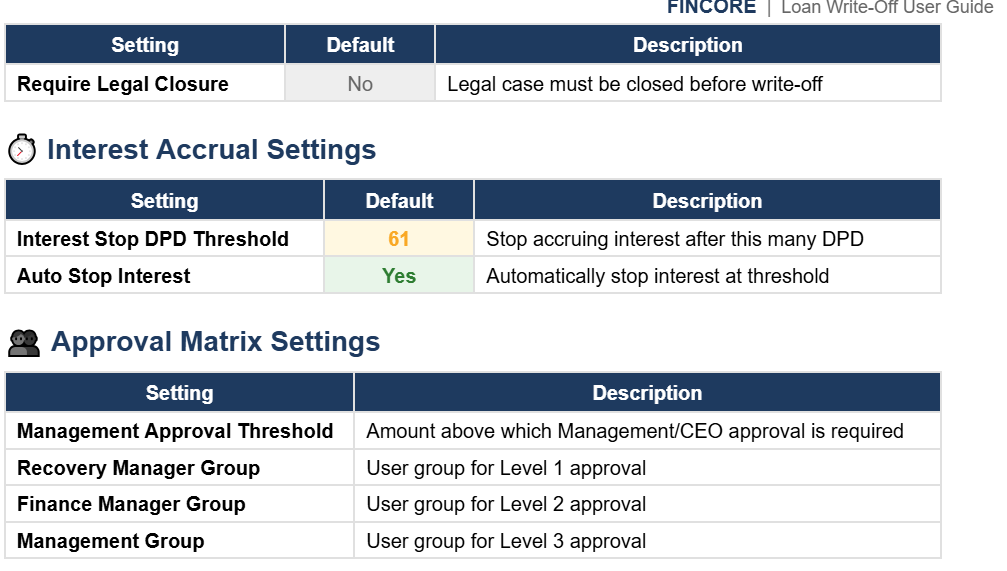
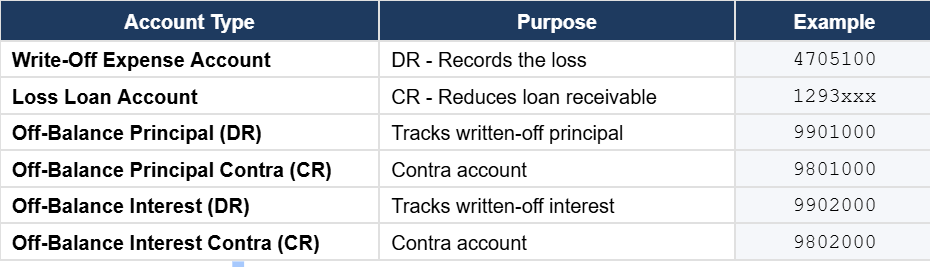
Account Configuration
Configure the General Ledger accounts used for write-off journal entries:
3. Eligibility Criteria
BOL Classification Requirements
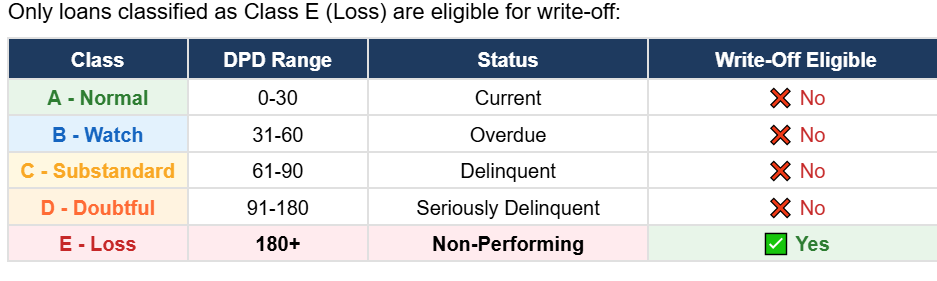
Additional Requirements
- Recovery Efforts Documented — All collection attempts must be recorded in the system
- Justification Provided — Minimum 50 characters explaining why write-off is necessary
Supporting Documents — Collection letters, legal documents, and other evidence attached
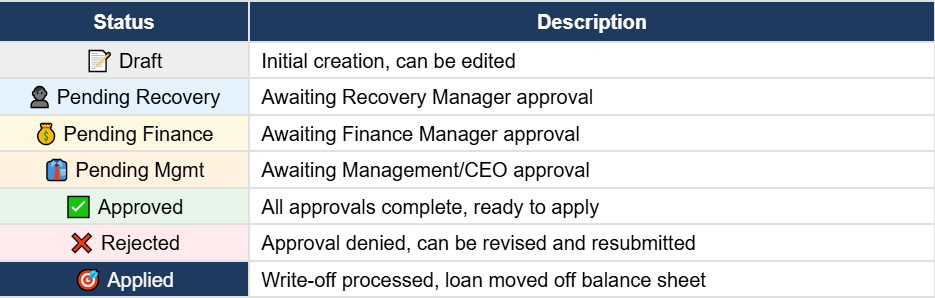
4. Write-Off Workflow
Workflow Overview
📋 Draft → 👤 Recovery Approval → 💰 Finance Approval
→ 👔 Management* → ✅ Approved → 🎯 Applied
*Management approval only if amount ≥ threshold
Step-by-Step Process
1.Create Write-Off Request
Navigate to Loans → Write-Offs → Write-Off Requests and click Create
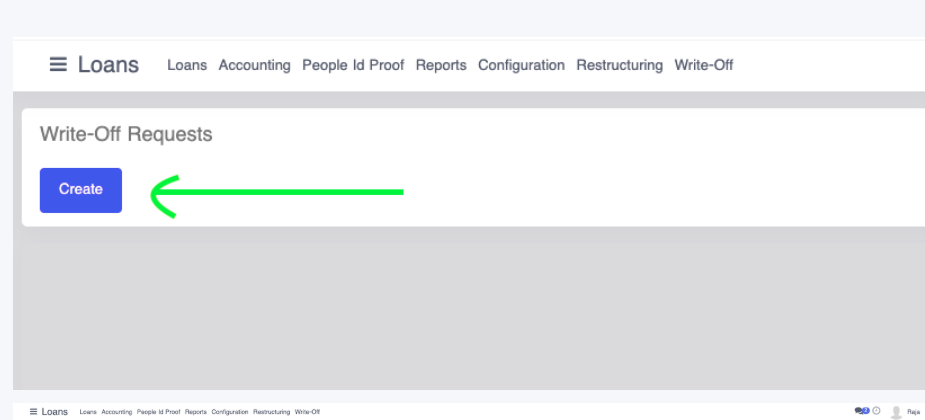
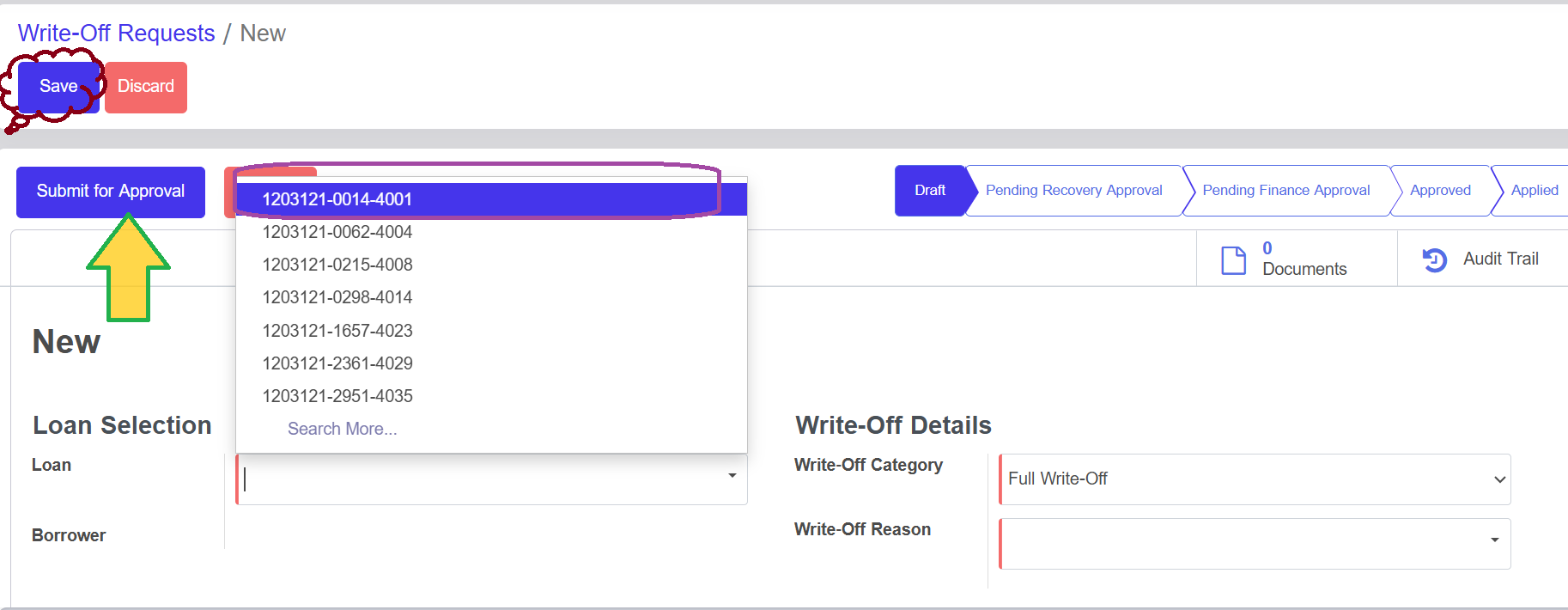
Complete the following fields:
- Select the loan to write off from the dropdown
- Choose Write-Off Category: Full Write-Off or Partial Write-Off
- Select Write-Off Reason from predefined options
- Enter Justification (minimum 50 characters)
- Attach supporting documents
3.Approval Process
Request moves through approval levels based on the amount
Approvers can take the following actions:

4.Apply Write-Off
After final approval, click Apply Write-Off to process the transaction
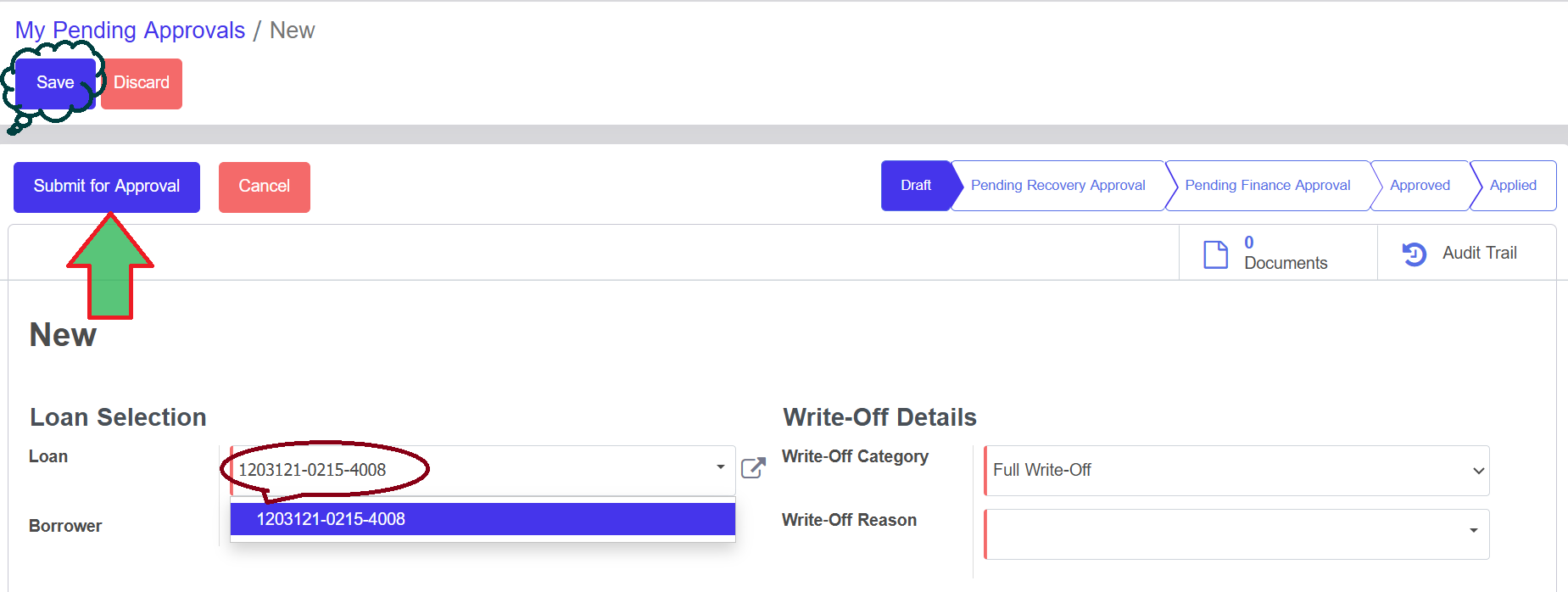
System automatically:
- Removes loan from active balance sheet
- Records off-balance sheet entries
- Stops interest accrual on the loan
- Changes loan status to "Written Off"
5. Approval Process
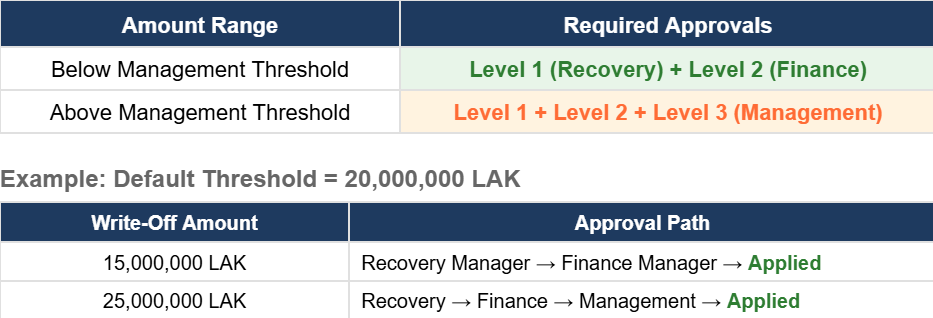
Multi-Level Approval Matrix
The number of approval levels depends on the write-off amount:
6. Recovery Tracking
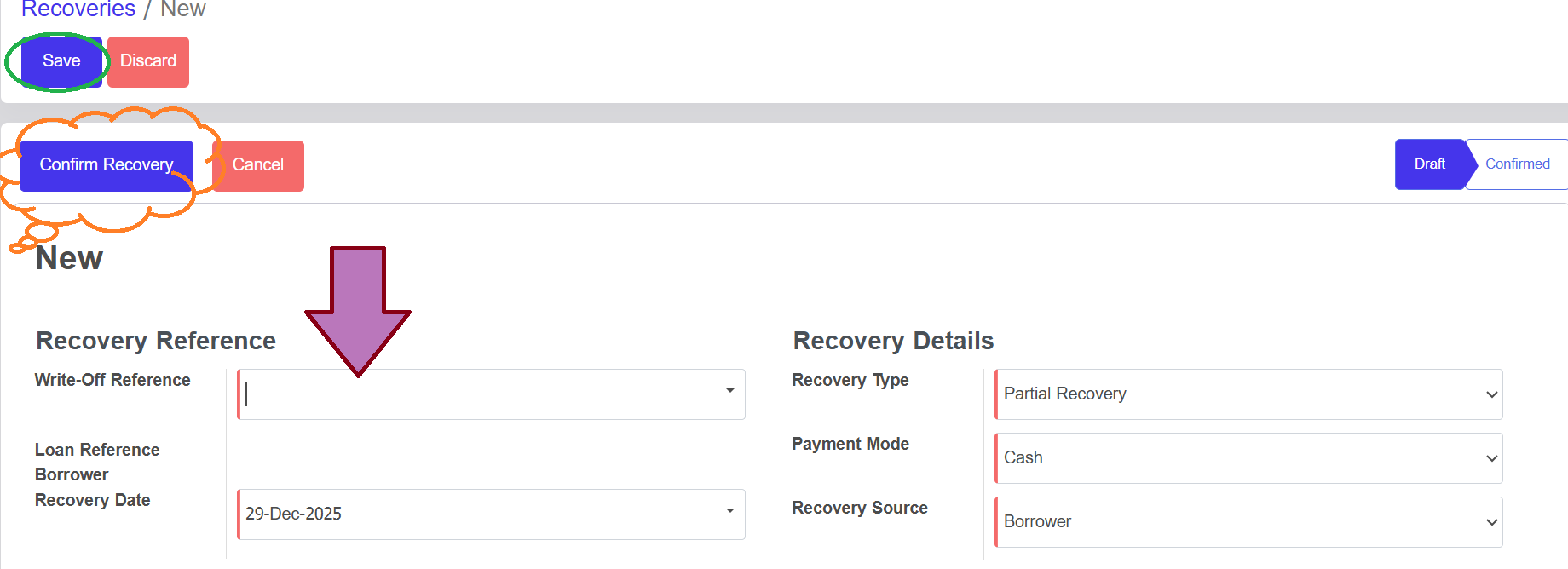
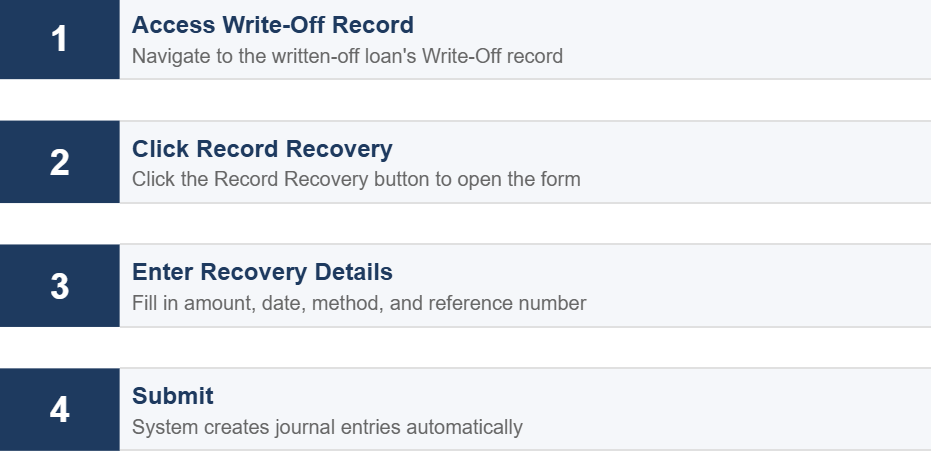
💰Post Write-Off Collections
Any payments received after a loan is written off are tracked as recoveries and recorded as income
Recovery Dashboard
Track recovery performance with key metrics:

7. Practical Examples
📘Example 1: Full Write-Off (Small Amount)
Scenario: Customer Mr. Somchai has an uncollectable loan
• Outstanding Principal: 5,000,000 LAK
• Outstanding Interest: 800,000 LAK
• Days Past Due: 200 days (Class E)
• Status: All recovery efforts exhausted
Write-Off Request Details:
- Loan: LO-2024-001
- Category: Full Write-Off
- Total: 5,800,000 LAK
- Reason: Recovery Exhausted
Approval Flow (Amount < 20,000,000):
Draft → Submit → Recovery Manager ✅ → Finance Manager ✅ → Approved
📙Example 2: Full Write-Off (Large Amount)
Scenario: Company ABC Co., Ltd declared bankrupt
• Outstanding Principal: 50,000,000 LAK
• Outstanding Interest: 12,000,000 LAK
• Days Past Due: 250 days
• Documents: Court order, Liquidation report
Approval Flow (Amount > 20,000,000):
Draft → Submit → Recovery ✅ → Finance ✅ → Management ✅ → Approved
📗Example 3: Partial Write-Off
Scenario: Customer has collateral that can be sold
• Outstanding Principal: 30,000,000 LAK
• Outstanding Interest: 5,000,000 LAK
• Collateral Value: 15,000,000 LAK (expected recovery)
Write-Off Request Details:
- Category: Partial Write-Off
- Write-Off Principal: 15,000,000 LAK (30M - 15M collateral)
- Write-Off Interest: 5,000,000 LAK
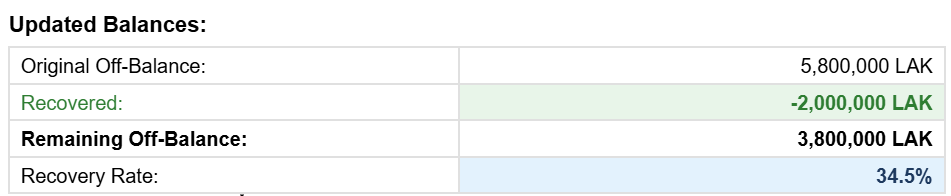
📕Example 4: Recovery After Write-Off
Scenario: Unexpected recovery from previously written-off loan
• Original Write-Off: 5,800,000 LAK (Example 1)
• Recovery Amount: 2,000,000 LAK
• Source: Customer's relative paid partial settlement
8. Quick Reference & Troubleshooting
✅ Write-Off Checklist
- Loan is 180+ days past due (Class E)
- Recovery efforts documented
- Justification provided (50+ characters)
- Supporting documents attached
- Write-Off reason selected
- Amounts verified (principal + interest)
📋 Status Reference
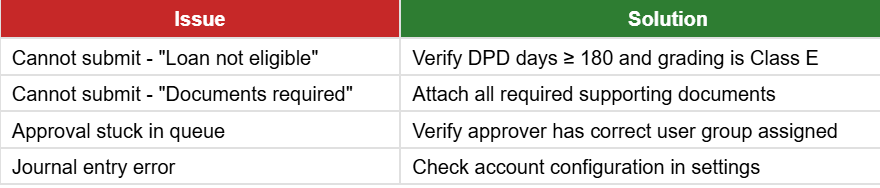
🔧 Troubleshooting